Workout tracker app for the gym: your last weight is filled in

Stop scrolling through notes between sets: your last weight and reps are already in the fields of your workout log. Lose the signal mid-workout and your sets stay on the phone, then go out when the connection is back. Free, no subscription, no ads.

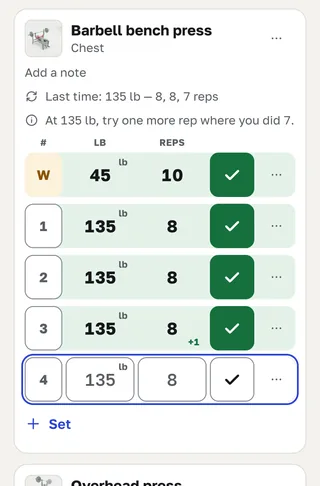
Bench press in a workout tracker: last weight and reps filled in, one set checked, rest timer running
  • Works in any phone’s browser — nothing to install
  • English or Russian, kg or lb
  • Export your whole log any time

What GymDay is: a gym tracker app for strength training

In your notes:Bench 135 × 8, 8, 7 — somewhere above last week’s squats.

In GymDay:open Bench press — 135 lb and 8 reps are already in the field.Did the same? Tap the check mark.

Made for the gym floor. A strength training log for sets, reps and weight. Each exercise opens with what you did last time, so you don’t search through old notes.

Built not to lose a set. Sets logged without a connection stay on the phone and are sent later. Deleted a workout by mistake? Tap Undo and it’s back. Your phone and your computer show the same log.

Your progress, nobody else’s. Records, charts and coach hints compare you only with your own past workouts. No feed, no rankings, no ads.

Log sets, reps and weight without retyping

Open a workout and pick an exercise. The fields already hold your previous weight and reps, and “Last time” shows the whole previous session for that exercise. Lifted the same? Tap the check mark. Did more? Change one number and tap it.

  1. Start a workout — empty, from a plan, or by repeating a past one. An empty one is fine to begin with.
  2. Pick an exercise: your last weight and reps are filled in.
  3. Tap the check mark after each set. The rest timer starts on its own; add or take 30 seconds with one button.
Bench press in a workout tracker: last weight and reps filled in, one set checked, rest timer running

When you’re comfortable

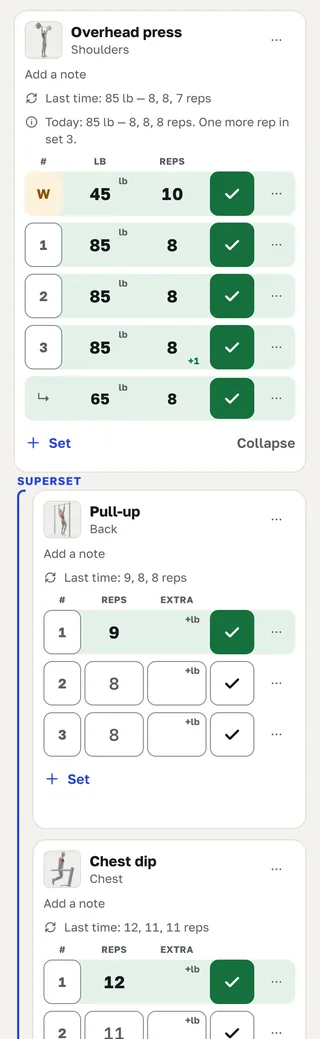
Mark warm-up sets and log drop sets under their set — neither counts toward your records. Pair two exercises into a superset and the workout takes you from one to the other. For dumbbells you log the weight of one dumbbell. Bodyweight moves, assisted pull-ups, timed holds and cardio by time, with distance where it matters, live in the same log.

A superset of two exercises with a warm-up set and a drop set in the workout log

Notes and photos for each exercise

Keep a note and your own photos on any exercise: machine setup, grip, stance — whatever you want to see before the first set.

Kilograms or pounds — switch any time in your profile and your whole history shows in the units you picked. In pounds a set stays the weight you loaded: 135 lb is 135 lb, not a converted fraction.

Offline set logging: nothing lost when the gym signal drops

Basements and steel walls kill the signal. GymDay is built so a set you’ve logged isn’t lost.

  • Start the workout while you have a connection. After that, log sets and finish the workout without one — each set is kept in the browser on your phone.
  • Adding a new exercise needs a connection.
  • A small bar shows what hasn’t been sent yet. When the connection is back, open GymDay and everything goes out on its own — even if you closed the tab in between.
  • Sending twice never creates a double set.
  • Clearing the browser’s site data before the bar is empty erases unsent sets.

Sign in on your phone and your computer: it’s the same workout history. A workout started on the phone can be finished on the computer.

Progressive overload tracker: hints on when to add weight

See whether each lift is growing — and the log tells you when it’s time to add weight.

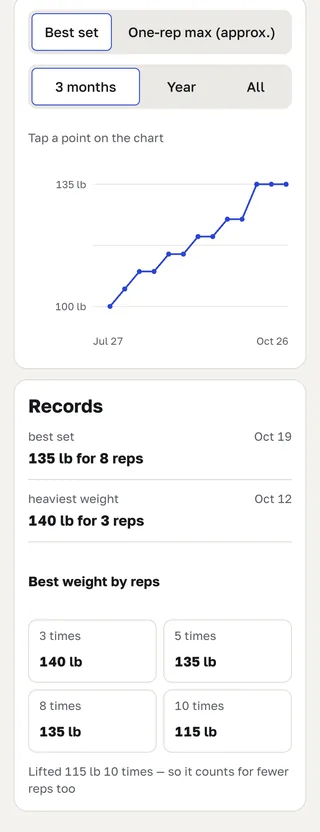
Bench press progress chart with personal records for 3, 5, 8 and 10 reps

Personal records and progress charts

Every exercise keeps its records: heaviest weight, best set, and best weight for 3, 5, 8 and 10 reps — a set of more reps counts for fewer reps, too. Switch the chart to an estimated one-rep max (e1RM). New records show up when you finish the workout. If a lift hasn’t moved for weeks, GymDay says so in plain words.

Sets per muscle group by week, month, quarter or year, and your workouts per week over the last 12 weeks — measured against your own history only.

Coach hints: when to add reps or weight

Give an exercise a target rep range and a weight step, and coach hints follow double progression: add reps until you reach the top of the range, then add weight. They also notice when a weight was too heavy twice in a row. Hints that change the weight show why they appeared. Turn hints off for one exercise or all of them.

Workout planner: routines for every training day

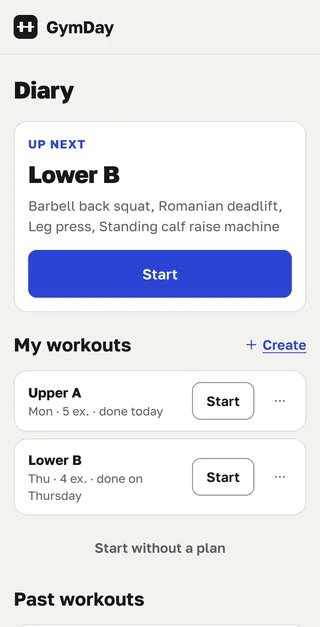
Save routines — “Legs”, “Monday: chest and back”, whatever you call them — with exercises and the number of sets. Pick training days and the Diary suggests today’s plan when you open it. Start a workout from a plan or repeat a past one. Had a good session without a plan? Save it as a routine afterwards.

Routines in the workout planner with today’s plan on top

Exercise library: barbell, dumbbell, machine and cable

Hundreds of exercises — barbell, dumbbells, machines, cables and bodyweight — each with a short technique video, target muscles and step-by-step instructions. Can’t find yours? Create your own exercise, with no cap on how many.

Body weight and measurements next to your lifts

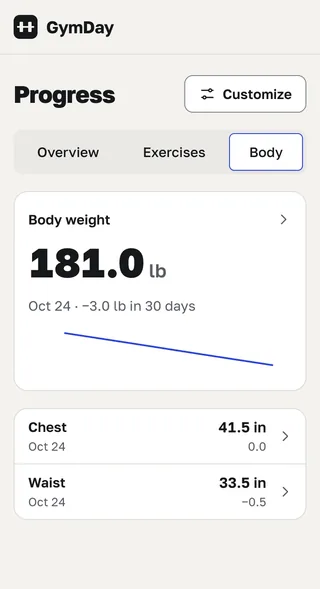
Log body weight, body fat, waist, chest, arms and other circumferences, and body composition — fat mass, muscle mass, body water. Add your own measurement if one is missing. Each has its own chart, so you see how your body changes alongside your strength.

Body weight chart with waist and chest measurements

Measurements are health data, so the first time you save one GymDay asks whether you agree to store it. They are for your own records, not a health assessment. If you withdraw consent, they are deleted and can’t be brought back.

Import your training log from a spreadsheet, export it any time

Import

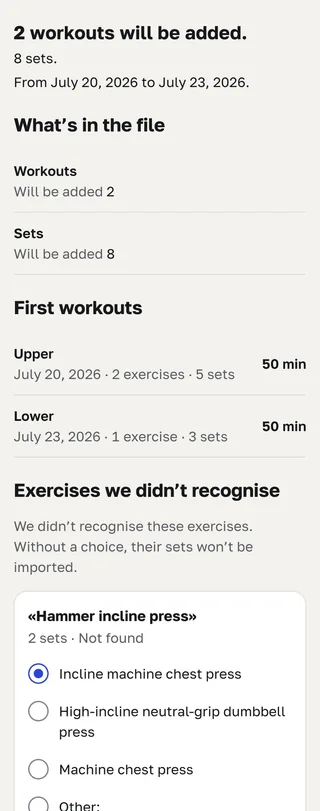
Kept your training in a spreadsheet? Download the GymDay file to fill in — date, exercise, weight, reps and a few more columns, headers in English or Russian — paste your rows from Google Sheets or Excel and upload it. GymDay matches exercise names with the library; for each new name you pick a match, create your own exercise or skip it. Nothing is written until you confirm. You can also upload a GymDay export ZIP back.

Your history is in phone notes? Give the text to your AI assistant: it can build the file for import, and you confirm it in GymDay.

Uploading the same file again doesn’t create duplicates.

Checking a spreadsheet file before importing the training log

Export

Download workouts, routines, your exercises, measurements and settings as a ZIP of tables that opens in Excel and Google Sheets — any time, free. Your exercise photos aren’t in the archive yet — open one on its exercise to save it. Delete your account in your profile whenever you want.

Ask your AI assistant about your workout history

Connect GymDay to Claude or ChatGPT and ask in plain words: “Chart my bench press for six months”, “Where am I stuck?”, “Log today’s workout”. GymDay works as an MCP server — the assistant reads and records only what you allow, and you can disconnect it any time. GymDay itself doesn’t write answers or programs.

Where am I stuck?

How to connect Claude or ChatGPT (MCP)

iPhone app, no account needed: coming soon to the App Store

The iPhone app is coming soon to the App Store. You’ll be able to use it without an account — all your workouts stay on your phone. Sign up only if you want sync with the website and other devices, the website itself, an AI assistant, or import and export on the website.

What works in the iPhone app and on the website

Feature iPhone app Website — in a phone or computer browser
No account needed
Yes Everything stays on the phone
No Email and password required
Sync across devices
Yes, after you sign in
Yes One history on every device
Rest timer on the Lock Screen
Yes
No
AI assistant: Claude, ChatGPT
Yes, after you sign in Connected on the website, uses the same log
Yes With an account
Price
Free, no in-app purchases
Free

Specifications

GymDay for iPhone

GymDay.fit: Workout Tracker

Coming soon to the App Store
Languages
English, Russian — follows your phone’s language
Age rating
13+
Category
Health & Fitness
Price
Free, no in-app purchases, subscription or ads
Privacy
Works without an account — your log stays on the iPhone
Not supported
iPad, Mac, Apple Watch, Apple Vision Pro

GymDay for Android

In development

No date yet. For now GymDay works in any Android phone’s browser, with the same log as on the website.

Coming soon to Google Play

Free workout tracker app: no subscription, no ads

GymDay is free. No subscription, no ads, and no caps on workouts, routines, your own exercises or history. Export, sync, import and access to your whole recorded history stay free while the service runs.

Price in the terms of use

Privacy: your training data stays yours

  • No ads, no analytics and no tracking counters.
  • We don’t sell your data and don’t train AI models on it.
  • We don’t compare you with other people or build rankings.
  • A person reads and answers [email protected].
Privacy policy

Short answers about GymDay

Is it really free?
Yes: no subscription and no ads. If GymDay ever closes, we’ll announce it in advance and leave time to download your data.
Does it work without internet?
Start a workout online, then log sets and finish it offline; sets are sent when you open GymDay with a connection again.
Is there an app?
The iPhone app is coming soon to the App Store. Android app in development; meanwhile, use GymDay in any phone’s browser.
Do I need an account?
For the website, yes — an email and a password. The iPhone app, coming soon to the App Store, will work with no account needed: everything stays on your phone. An account is only for sync with the website and other devices, an AI assistant, and import and export on the website.
Can I bring my spreadsheet or notes?
A spreadsheet — through the GymDay file to fill in; notes — through your AI assistant.
Can I take my data with me?
Any time: a ZIP of tables in your profile, free.

Start your workout log today

Free, no subscription. Only an email and a password.

Create a free account